Binary images and morphology
- •
Binary conversion and thresholding
- •
- •
- •
Otsu's method
- •
selects a global threshold from the intensity histogram, rather than requiring a manual .
- •
maximizes between-class variance: .
- •
are class proportions; are their intensity means.
- •
equivalent to minimizing within-class variance for this two-class partition.
- •
often useful for separated foreground/background distributions; it does not understand object meaning.
- •
overlap, severe class imbalance, and uneven illumination can give poor segmentation.
- •
constant images have no meaningful intensity separation; do not treat an automatically returned threshold as proof of two classes.
- •
- •
for noisy input, asses suitable denoising before threshold selection
- •
over-smoothing can merge objects or erase small features
- •
- •
Structuring element, hit, and fit
- •
Structuring element (SE) -> a footprint defining which relative positions participate in a morphological operation.
- •
Common footprints
- •
filled square -> all positions active.
- •
plus/cross -> center and horizontal/vertical neighbors.
- •
X -> center and diagonal neighbors.
- •
horizontal/vertical line -> favors the corresponding orientation.
- •
slash/backslash -> favors a diagonal direction.
- •
a large or poorly matched SE can remove wanted structures or merge distinct objects.
- •
- •
Hit -> at least one active footprint position overlaps foreground.
- •
Fit -> every active footprint position overlaps foreground.
- •
- •
do not confuse an ordinary hit test with the hit-or-miss transform, which matches specified foreground and background patterns together.
- •
- •
Basic morphology
- •
Filling and connected components
- •
Region/flood filling -> grow a connected region from a seed until its boundary is reached
- •
similar to a paint-bucket tool; connectivity and the acceptance rule define where filling spreads
- •
- •
Hole filling -> fill background components that are not connected to the image exterior
- •
Connected-component labeling -> assign one integer ID to each connected foreground component; background remains 0
- •
Two-pass labeling, row-major scan
- •
labels support component counts, areas, and bounding boxes; use nearest-neighbor interpolation if resizing a label map
- •
- •
Thinning, skeletons, and convex hulls
- •
- •
- •
Skeletonization
- •
Convex hull
- •
smallest convex set containing the foreground, represented on the image grid
- •
convex means the segment joining any two points stays within the set
- •
not the polygon with the fewest straight edges, and not a tight outline around concavities
- •
a hull of all foreground may bridge separate objects; compute per component when that is not intended
- •
- •
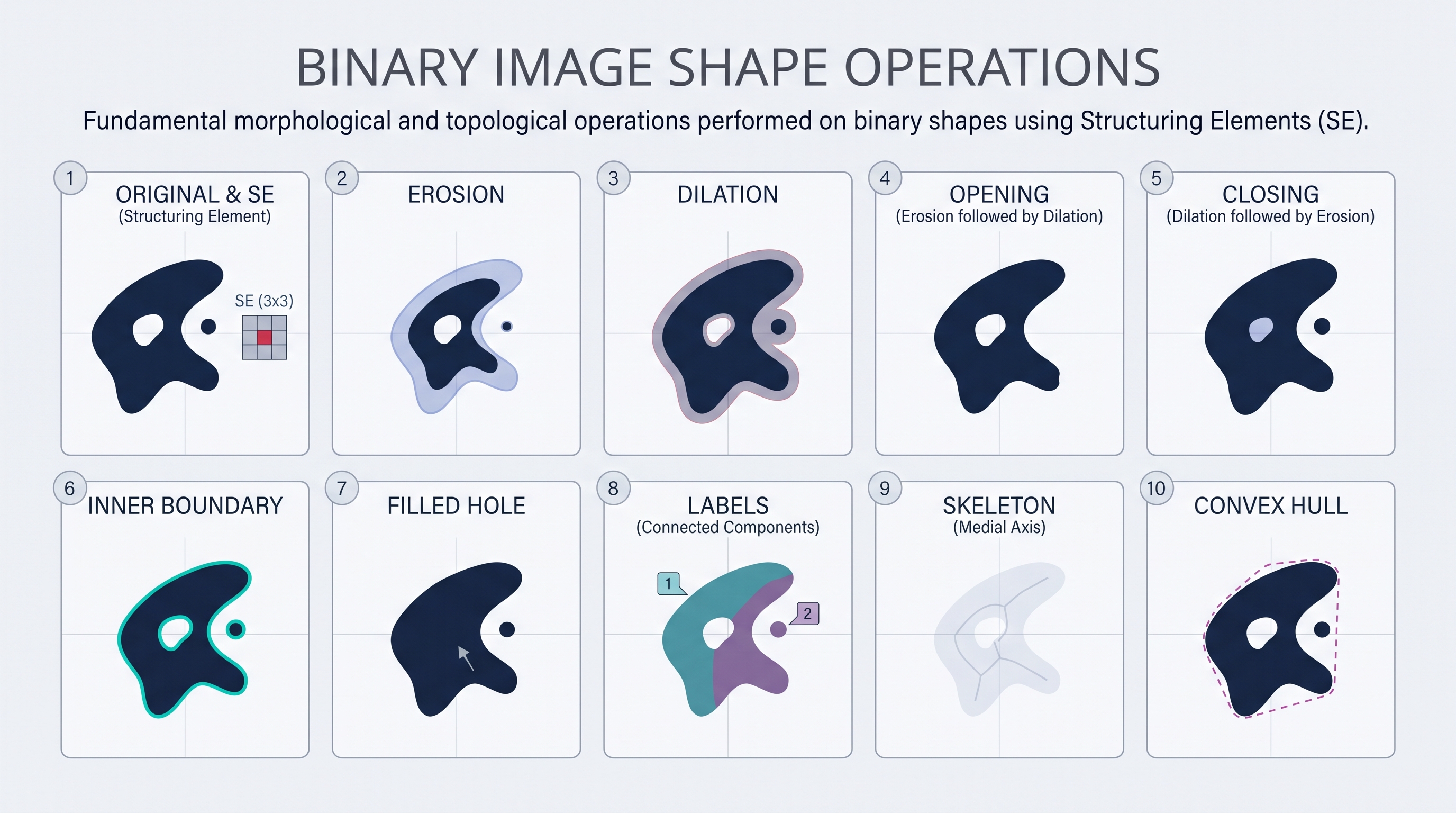
- •
Python: binary masks and morphology
- •
run after
require_u8from teaching code 1; uses the existing OpenCV, NumPy, and scikit-image dependencies. - •
uses a centered symmetric square and explicit zero-valued morphology borders.
- •
filling pads the mask with background so flood filling can reach the exterior even when an object touches the original corner.
- •
the example uses 4-connected background filling; foreground labeling connectivity is selected separately.
- •
- •
synthetic arrays stay in memory; no images or diagrams are generated or saved.
- •
import cv2
import numpy as np
from skimage.morphology import skeletonize, thin, convex_hull_image

def binary_demo(gray, threshold=None, connectivity=8):
      require_u8(gray, color=False)
      if connectivity not in (4, 8):
          raise ValueError("connectivity must be 4 or 8")
      if threshold is None:
          T, mask = cv2.threshold(gray, 0, 255, cv2.THRESH_BINARY | cv2.THRESH_OTSU)
      else:
          if not np.isfinite(threshold) or not 0 <= threshold <= 255:
              raise ValueError("threshold must be finite in 0..255")
          T, mask = cv2.threshold(gray, float(threshold), 255, cv2.THRESH_BINARY)
      S = np.ones((3, 3), dtype=np.uint8)
      border = dict(borderType=cv2.BORDER_CONSTANT, borderValue=0)
      eroded = cv2.erode(mask, S, **border)
      dilated = cv2.dilate(mask, S, **border)
      opened = cv2.morphologyEx(mask, cv2.MORPH_OPEN, S, **border)
      closed = cv2.morphologyEx(mask, cv2.MORPH_CLOSE, S, **border)
      padded = np.pad(mask, 1, constant_values=0)
      flooded = padded.copy()
      cv2.floodFill(flooded, None, (0, 0), 255, flags=4)
      holes = cv2.bitwise_not(flooded[1:-1, 1:-1])
      count, labels, stats, centroids = cv2.connectedComponentsWithStats(mask, connectivity=connectivity)
      foreground = mask != 0
      hull = convex_hull_image(foreground) if foreground.any() else foreground.copy()
      return {
          "threshold": T, "mask": mask, "eroded": eroded, "dilated": dilated,
          "opened": opened, "closed": closed, "boundary": cv2.subtract(mask, eroded),
          "filled": cv2.bitwise_or(mask, holes), "labels": labels,
          "count": count - 1, "stats": stats[1:], "centroids": centroids[1:],
          "thin": thin(foreground), "skeleton": skeletonize(foreground), "hull": hull,
      }

levels = np.array([[0, 100, 101, 255]], dtype=np.uint8)
assert binary_demo(levels, threshold=100)["mask"].tolist() == [[0, 0, 255, 255]]
ring = np.zeros((9, 9), dtype=np.uint8)
ring[2:7, 2:7] = 255
ring[3:6, 3:6] = 0
result = binary_demo(ring)
assert result["count"] == 1 and result["filled"][4, 4] == 255
assert np.count_nonzero(result["mask"]) == 16
assert np.count_nonzero(result["filled"]) == 25
assert np.all(result["skeleton"] <= (ring != 0))
diagonal = np.zeros((5, 5), dtype=np.uint8)
diagonal[1, 1] = diagonal[2, 2] = 255
assert binary_demo(diagonal, connectivity=4)["count"] == 2
assert binary_demo(diagonal, connectivity=8)["count"] == 1
assert binary_demo(np.zeros((5, 5), dtype=np.uint8))["count"] == 0
- •